
Download AndroVDR APK – Remote Control App for VDR Owners, Live TV Streaming, SSH Tunneling, WakeOnLan
Overview
AndroVDR is a specialized remote control application designed for owners of Video Disk Recorder (VDR) systems. It enables seamless interaction with VDR servers from an Android device, offering a streamlined way to manage media playback, system controls, and network connectivity. The app is particularly useful for users who rely on VDR for live TV recording, playback, and digital video management. It addresses the need for remote access to a home media server, allowing users to control their VDR setup from anywhere within their local network or over the internet.
Target users include hobbyists, home theater enthusiasts, and advanced users managing personal media centers. The app supports multiple VDR instances, making it ideal for users with complex or multi-device setups. Real-world usage scenarios include adjusting playback settings, switching between live TV channels, managing recordings, and remotely waking up a VDR device via WakeOnLan. It also facilitates secure remote access through SSH tunneling, enhancing usability for users who need to control their VDR outside their home network.
The developer, AndroVDR, has focused on delivering a lightweight and functional tool tailored to a niche audience. The app's free pricing model suggests a community-driven or open-source development approach, though no further details about the company or project background were provided.
Key Features & Capabilities
- Remote VDR Control – Allows users to manage multiple VDR servers from a single Android device, enabling channel changes, playback control, and recording management via a touch interface.
- Adjustable Text Size and Layouts – Offers customizable display settings with two built-in layouts and support for user-defined layouts, improving accessibility and personalization.
- Gesture-Based Navigation – Supports simple swipe gestures to switch between layouts, enhancing workflow efficiency and reducing touch input effort.
- SSH Tunneling for Remote Access – Enables secure connections to VDR servers over the internet using SSH tunneling, allowing remote control even when outside the local network.
- WakeOnLan Support – Allows users to power on a VDR device over WLAN or the internet, eliminating the need for physical access to the machine.
- Live TV Streaming – Provides the ability to watch live TV streams from the VDR, though this requires a streamdev server and an external media player such as VPlayer, Wondershare Player, or MX Player.
- Hardware Key Volume Control – Utilizes device volume keys for adjusting playback volume, offering a familiar and intuitive control method.
These features are particularly beneficial for users who want to integrate their VDR into a smart home entertainment ecosystem. The ability to control multiple VDRs and access live streams remotely makes AndroVDR a valuable tool for advanced media management. The support for external players ensures compatibility with a wide range of media playback solutions.
User Interface, Workflow & Performance
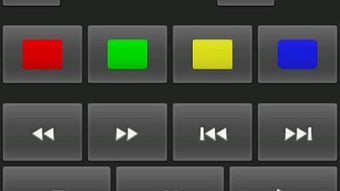
AndroVDR features a clean, minimalistic interface designed for efficient remote control operations. The layout system is central to the user experience, with two default configurations and the ability to define custom layouts. Users can switch between layouts using a simple swipe gesture, which reduces navigation time and improves responsiveness. The interface is structured to prioritize essential controls such as channel selection, playback functions, and volume adjustment.
Navigating through the app is straightforward, with intuitive touch interactions and minimal on-screen clutter. The use of gestures for layout switching aligns with modern Android design patterns, enhancing usability. However, the developer did not specify resource usage details, so performance behavior under different conditions remains unclear. General software behavior suggests low CPU and RAM consumption due to the app’s small file size of 1.2 MB, but this is not confirmed.
Stability and long-term reliability are not documented in the provided information. Users are advised to ensure their VDR server and network configuration are properly set up to avoid connection issues. The app’s reliance on external components like streamdev servers and third-party players may impact overall performance and user experience.
Compatibility & System Requirements
AndroVDR is designed for Android devices and is compatible with all versions of the operating system that support the required network and security features. The app has a file size of 1.2 MB, indicating a lightweight footprint that should not strain device storage or performance. However, exact system requirements were not listed by the developer, including minimum Android version, processor specifications, or RAM needs.
Installation is straightforward, as the app is distributed as an APK file, which can be installed directly on Android devices. Users should ensure their device supports SSH tunneling, WakeOnLan, and external media player integration for full functionality. Compatibility with specific VDR server configurations may vary depending on the server setup and network environment.
The developer did not provide additional system requirements, so users should proceed with caution when deploying the app on older or less capable devices. Network stability and proper configuration of the VDR server are critical for consistent performance.
Pros and Cons
Pros
- Free to download and use, making it accessible to a wide audience.
- Supports multiple VDR instances, ideal for complex home media setups.
- Offers customizable layouts and gesture-based navigation for improved usability.
- Includes secure SSH tunneling for remote access over the internet.
- Enables WakeOnLan for remote power-on functionality.
- Allows live TV streaming with external players, expanding entertainment options.
Cons
- Requires external tools like streamdev server and third-party players for live TV viewing.
- Exact system requirements and compatibility details were not provided.
- Performance and resource usage are not documented.
- Dependent on proper VDR server configuration for full functionality.
- No built-in media player limits flexibility for users unfamiliar with external tools.
FAQ Section
Is AndroVDR compatible with all Android devices?
AndroVDR is designed for Android, but the developer did not specify minimum system requirements. Compatibility may vary depending on the device's Android version and network capabilities.
Can I use AndroVDR to watch live TV?
Yes, live TV streaming is supported, but it requires a streamdev server on the VDR and an external media player such as VPlayer, Wondershare Player, or MX Player.
Is the app secure when used over the internet?
Yes, the app supports SSH tunneling, which provides a secure connection to VDR servers over the internet, protecting data during transmission.
Does AndroVDR require a paid license?
No, AndroVDR is completely free to download and use. There are no subscription fees or in-app purchases.
Can I control multiple VDR servers with one app instance?
Yes, AndroVDR allows users to manage and control multiple VDR servers from a single device, making it suitable for users with distributed media setups.
Final Thoughts + CTA
AndroVDR stands out as a focused, efficient remote control tool tailored to VDR enthusiasts who value flexibility, security, and remote access. Its lightweight design, customizable interface, and support for advanced features like SSH tunneling and WakeOnLan make it a practical choice for users managing personal media servers. While the lack of detailed system requirements and performance data limits full transparency, the app delivers on its core promise: reliable remote control of VDR systems.
It is especially beneficial for advanced users, home theater builders, and hobbyists who rely on VDR for live TV and recording management. The integration with external players for streaming adds versatility, though it requires additional setup.
Download AndroVDR now to enhance your VDR experience with remote control, live TV access, and secure connectivity.






.png)
